Every fix below comes from an actual support case. If something's off, skim the jump links, find your symptom, and try the fix. First move for almost everything: open PassthroughForge and hit Check for updates - a good share of past reports were already fixed in a later version.
Controller tracking (Mask Lock) doesn't work
Your masks won't follow the controller, or the pose reads “No pose” in red? Work through these in order - the very first point is what trips up most people.
PassthroughForge reads the controllers through the sim's active OpenXR VR session. If the sim isn't rendering in VR, there is no session to read from - so the controllers stay “No pose” and Mask Lock has nothing to follow.
Microsoft Flight Simulator especially: just starting MSFS through Virtual Desktop is not enough. You have to enter VR mode inside MSFS (the VR toggle - default Ctrl+Tab, or your bound VR-toggle button) so the headset shows the in-cockpit VR view. Only then does controller / Mask-Lock tracking switch on. Sitting in the flat 2D window over Virtual Desktop will never track the controllers.
Do this: headset on → load the flight → switch the sim into VR mode → confirm you see the cockpit in VR → then check the pose in PassthroughForge.
In the Virtual Desktop Streamer (on your PC) and on the headset, make sure every one of these is true:
- VDXR is your active OpenXR runtime (Streamer → Streaming → set VDXR as the OpenXR runtime).
- “Forward tracking data” is ON.
- “Track controllers” is ON.
- The controllers are on, paired and awake - hold or move them and keep them in the headset cameras' view. Set-down controllers fall into deep sleep and the pose goes red.
- You are in the sim's VR mode (the step above).
Healthy tracking shows “optical tracking REGAINED (flags=0xF)” in the layer log; flags=0x0 means the runtime isn't tracking the controllers at all - a Virtual Desktop / headset issue, not PTF.
A rig-mounted controller still falls asleep, and you obviously can't wave it around to wake it. Do it without touching the mount like this:
- Press the Menu button - the one with the three lines (☰) - on the left controller.
- Then give the controller a couple of taps / knocks. The small jolt wakes its tracking sensors and the runtime picks the pose back up.
The pose should flip back to green (optical tracking REGAINED, flags=0xF in the log). Repeat whenever it's been sitting idle for a while.
If you're in VR mode and every Virtual Desktop setting above is correct but the controllers still won't track, another OpenXR API layer (OpenKneeboard, OpenXR Toolkit, fpsVR, …) may be sitting in front of PassthroughForge and interfering with how it hooks the controllers.
Test it:
- Grab the free OpenXR API Layers GUI: github.com/fredemmott/OpenXR-API-Layers-GUI.
- In the list of active layers, move PassthroughForge to the very top so it runs first. This is a test to rule out another layer grabbing the controller input before PTF sees it.
- Restart your computer. This matters - the OpenXR runtime and its layers only re-read their configuration on a fresh boot, so the new layer order (and the Virtual Desktop changes above) don't take effect until you reboot.
- Back in VR, check the controller pose again.
Masks & display
Masks are not mutually exclusive - every enabled mask shows together. You most likely have some toggled off.
Fix: enable each mask's visibility in its tab, or just click the green Show All Masks button in the top bar (one click brings them all in). The keyboard shortcut Ctrl+F9 toggles all masks at once. Show All Masks added v2.97.224
Fix: reload the profile (or toggle the mask off and on). This is a known GPU shared-texture quirk on some setups; a reload re-establishes the mask surface. If it keeps happening, post it in the Discord.
Fix: the keying happens inside Virtual Desktop, after PTF hands off the frame, so PTF can't fully remove it - but you can tame it a lot. There's a whole guide on it: A Crisp Mask Edge - the VD settings that matter most (HEVC 10-bit, bitrate, VDXR, chroma smoothness), mask resolution, and PTF's Black border to cover any last fringe.
Fix: change the passthrough color under Settings to one that doesn't appear on your instruments (magenta and green are good choices), and set Virtual Desktop's chroma-key color to match. If the color PTF punches through is the same blue as your PFD, that display will show through - pick a color your cockpit never uses.
VR view spins wildly / no masks — PassthroughForge is running as administrator
Nine times out of ten this means PassthroughForge is running as administrator (elevated) while the sim is not. It typically shows up right after you install or update and left the “Launch PassthroughForge” box ticked on the installer's last page, or if you pinned PTF to Run as administrator.
Why it breaks: DCS and MSFS run at normal (medium) integrity, and PTF's OpenXR layer lives inside the sim. To draw your masks that layer has to read PTF's shared textures across processes — but Windows forbids a normal-integrity process from opening an elevated one. The mask frames get rejected, the sim can't submit a valid VR frame, and the headset compositor just keeps re-projecting the last one — which you see as the wild spinning / smearing (or simply no masks at all).
The tell-tale: it works perfectly the moment you close PTF and start it again normally, then launch the sim. That on/off behaviour is the giveaway.
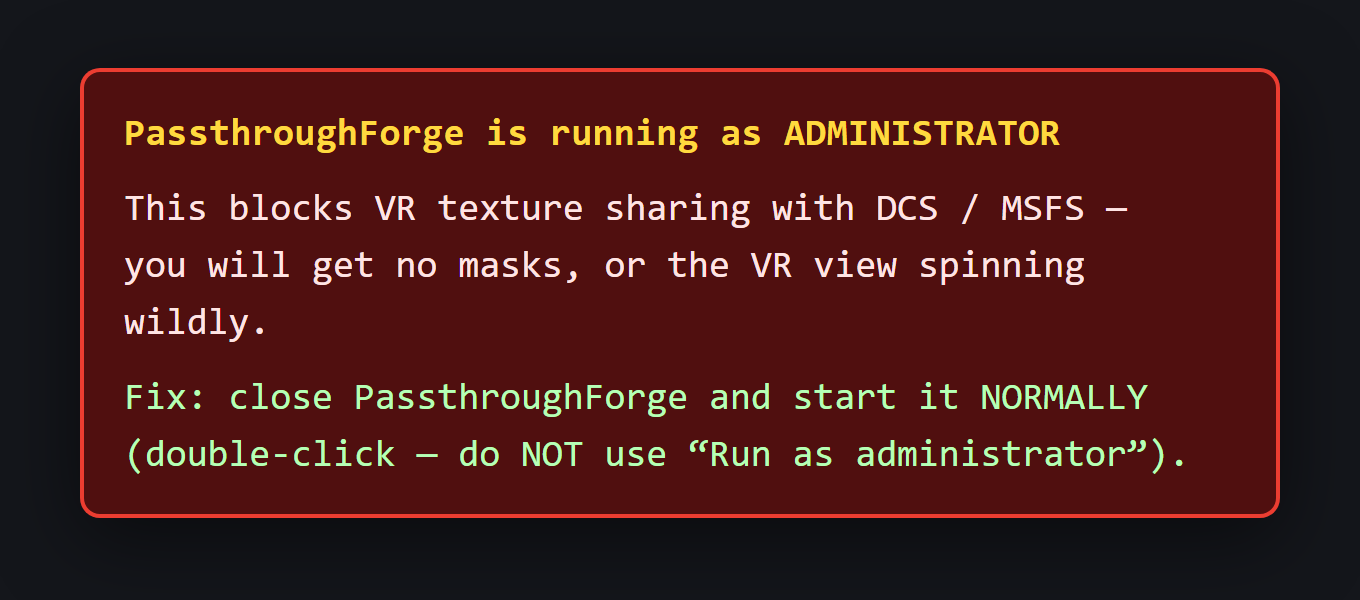
Fix — on current builds you don't have to do anything: v2.97.232 detects this and de-elevates itself automatically at startup, so PTF never stays elevated. Just hit Check for updates. Auto de-elevate v2.97.232
On older builds, or if it ever slips through:
- Close PassthroughForge (tray → Exit, or end it in Task Manager) and start it again normally — a plain double-click, not “Run as administrator” — before you launch the sim.
- Never tick Properties → Compatibility → Run this program as an administrator for PTF (or for the sim launcher).
- PTF does not need admin rights to run — only the installer briefly does, and it hands off to a normal-user launch by itself.